Call 855-878-8477
A desk phone, a mobile phone and a laptop on a desk in warm window light

Unified Communications

Business Text Messaging From Your Own Business Number

Business text messaging from the number customers already know, with consent built in. Pro for one-to-one texting, Enterprise for lists and mass notification.

Book a Short Demo

At a glance

Texting From your business number
Consent STOP and START on every send
Pro One-to-one texting with Context
Enterprise Lists and mass notification

True Messaging lets your staff text from the business number customers already call. Pro covers texting with consent built in, a personal inbox and contacts, plus TIPS Context beside the conversation. Enterprise adds canned responses, away messages, and mass notification to lists by text, voice and email.

Texting from the number your customers already know

True Messaging works with our hosted phone system, and it also works on its own for texting only, on a number from us. On our phone system, your staff text from the business number your customers already know, with pictures and the full conversation history kept on that number. You can add standard texting to your phone system. True Messaging adds consent tracking and an inbox with contacts on top of it.

Pro and Enterprise

True Messaging starts at Pro. Enterprise adds the tools for teams and lists.

What it doesProEnterprise
Texting and consent
Send and receive texts on an existing number Yes Yes
Send and receive pictures Yes Yes
Conversation history stays on the number Yes Yes
STOP and START honored on every send Yes Yes
Consent tracked per number Yes Yes
Block a sender Yes Yes
Inbox, contacts and replies
Personal number inbox Yes Yes
One-to-one contacts and sending Yes Yes
Merge duplicate contacts Yes Yes
Share a number with an assistant Yes Yes
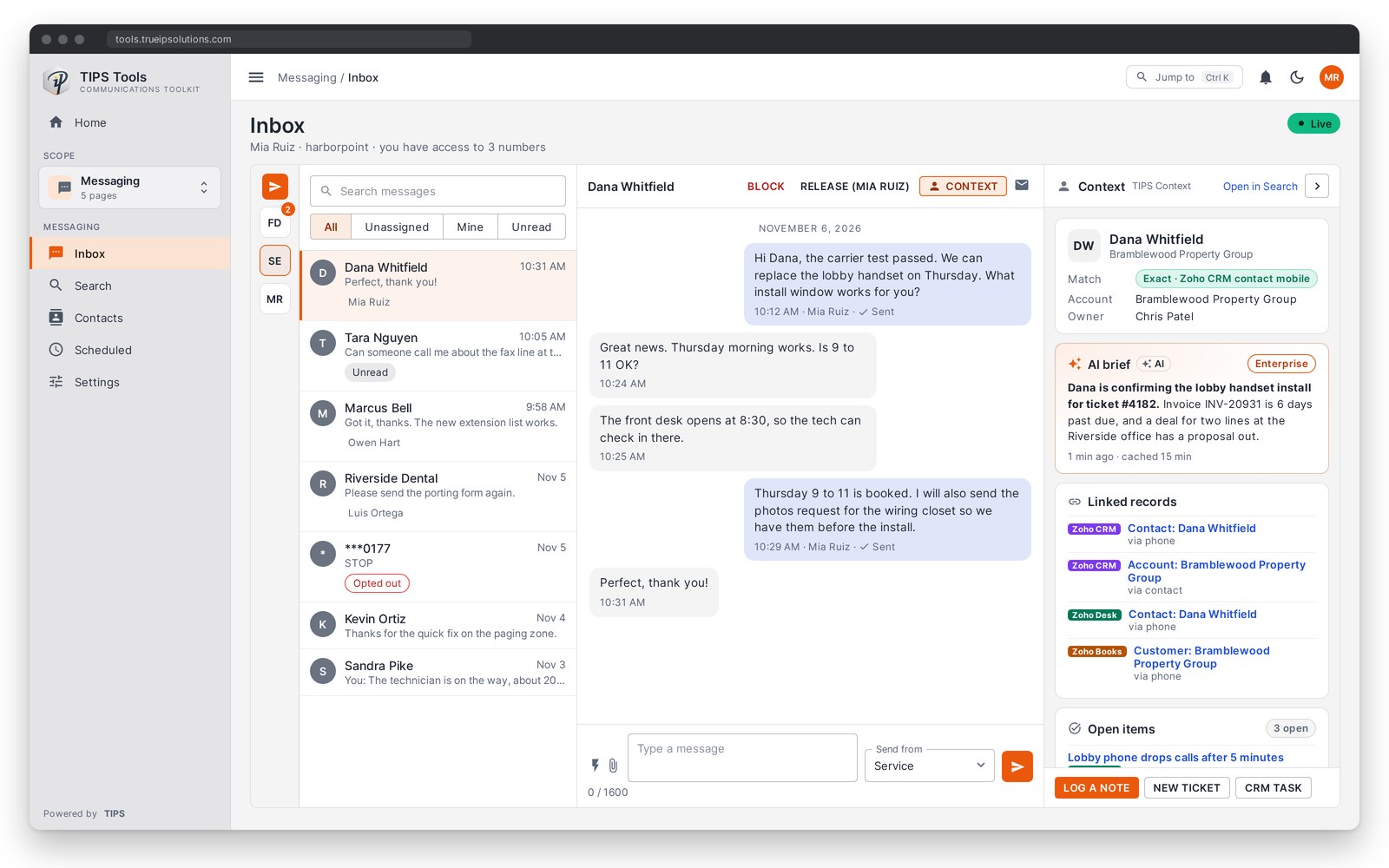
TIPS Context beside the conversation Yes Yes
Canned responses No Yes
Custom stop keywords No Yes
Away messages on a personal number, with timeframes No Yes
Away messages on a call queue No Yes
Contact import No Yes
Preferred language stored per contact No Yes
Lists and mass notification
Distribution lists No Yes
Group send to a list No Yes
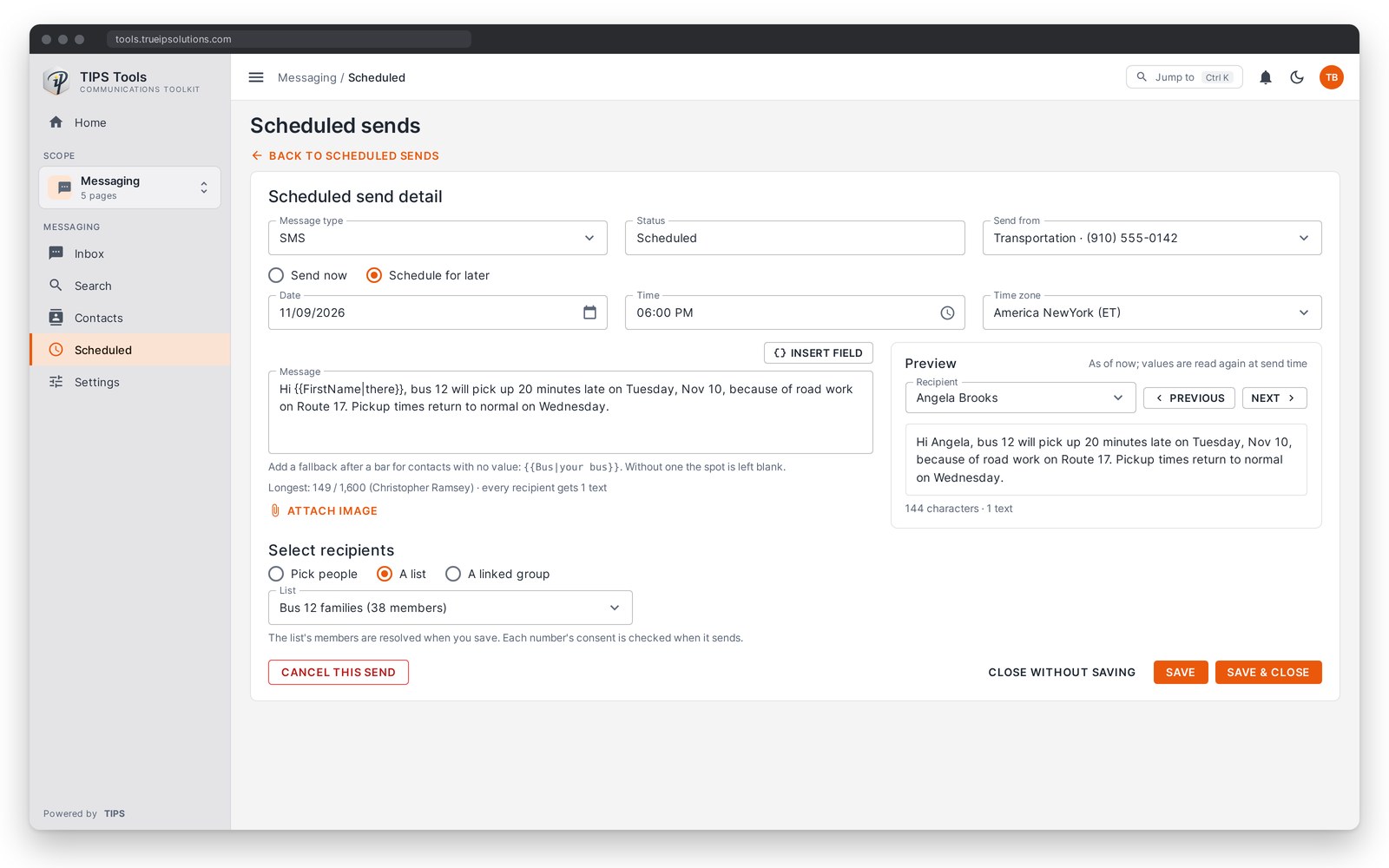
Scheduled send, editable until it goes out No Yes
Voice messages to a list, pre-recorded or text-to-voice No Yes
Email to a list No Yes
Lists that follow a group in a connected system No Yes
Send by text: start a send to a list from your verified mobile, confirmed with a PIN No Yes
Registration and consent for lists
Public registration page with consent time and IP recorded No Yes
JOIN keyword opt-in, with custom keywords such as "text BUS to join" No Yes
Your logo on the registration page and the opt-out page No Yes
Public opt-out page No Yes
Email captured on the registration page No Yes

What Enterprise adds

Replies and away messages

Save canned responses, set custom stop keywords, and set away messages on a personal number or a call queue, with timeframes.

Lists and mass notification

Import contacts with a preferred language for each, and build lists. Then send a text, a voice message or an email to a list, now or on a schedule. This is the system behind our mass notification service.

See mass notification →

Consent for lists

People join by a registration page or a JOIN keyword, with the time and IP recorded, and leave through STOP or the opt-out page.

Context in the inbox

How this fits the whole call center

Frequently asked questions

What is the difference between Pro and Enterprise?

Pro is texting from a number with consent built in, a personal inbox, contacts and number sharing with an assistant, plus TIPS Context beside the conversation. Enterprise adds canned responses, custom keywords, away messages, contact import, lists, and mass notification by text, voice and email.

What if we only need standard texting?

You can add standard texting to any number on our phone system, with pictures, conversation history, and STOP and START handled. True Messaging adds consent tracking, a personal inbox, contacts and TIPS Context.

Can we send mass notifications with True Messaging?

Yes, on Enterprise. You send a text, a voice message or an email to a list, now or on a schedule.

How does consent work?

STOP and START are honored on every send, and consent is tracked per number. On Enterprise, people join a list by a registration page or a JOIN keyword, and the time and IP are recorded.

Can staff share a number?

On Pro, an owner can share a number with an assistant.

Do we need your phone system to use True Messaging?

No. You can use True Messaging for texting only, on a new number from us. A number that stays with another phone provider cannot be used for texting. It also runs on our hosted phone system, and the Pro and Enterprise levels of our call center include True Messaging.

Do you publish prices?

No. We quote after a short call, because pricing depends on the level, the users you turn on for it, the texting lines you need and the type of organization.

See True Messaging on your own number

Book a short demo and we will show you a text, a list send and a registration page the way your office would use them.